
Features
OntraOS has an area for each department of a service business. Owners turn the optional areas on and off, so each company sees only what it uses.
Everyday tools
Dashboard and "Needs my action"
Today's work, and a list of what waits for you, most urgent first.
To-dos and approvals
To-dos for yourself, a colleague or a team. Low-margin quotes, large purchase orders, overtime and leave wait in one approval queue.
Inbox and two-way SMS
Shared and personal mailboxes with rules and replies from OntraOS. Texts and replies go under the right job or customer.
Team chat, voice rooms and calls
Direct, group and job chats with online status. Join a voice room or call a colleague from their chat.
Clock on and timesheets
Paid time comes from clock sessions. Travel between jobs is worked out for you, and every unbillable entry has a reason.
AI assistant and site help
Ask questions in plain words or by voice. A technician gets steps for a fault from job history, knowledge articles and manuals, with sources.
Search, split view and filters
Ctrl + K finds any record. Open two pages side by side. Filter any table like a spreadsheet.
Your own look and language
Light or dark, colour themes, text size and spacing. English, Chinese or Malay, with local dates and numbers.
Marketing
Lead sources and campaigns
Record where each enquiry and customer came from, and the campaign that brought it, with its dates and cost.
Marketing results
Enquiries, quotes and work won for each lead source and campaign, against what each campaign cost.
Sales
Customers, sites and contacts
Many sites and contacts for each customer, a status and an account owner, and a full history.
Protected access codes
Gate, door and alarm codes that only some people can show. Every view is logged.
Enquiries and the sales pipeline
New work from phone, email, a web form or Outlook. Follow each deal through your own stages to won or lost.
Quotes and revisions
Sections, price list lines, markup and tax, PDFs and online acceptance. Revise a sent quote, and compare the revisions.
Call log and customer import
Log calls with a follow-up to-do. Import customers, contacts, sites and assets from a CSV file.
Production
Jobs
Your own job statuses, job templates, notes, photos, files, costs and a chat for each job.
Scheduler and map
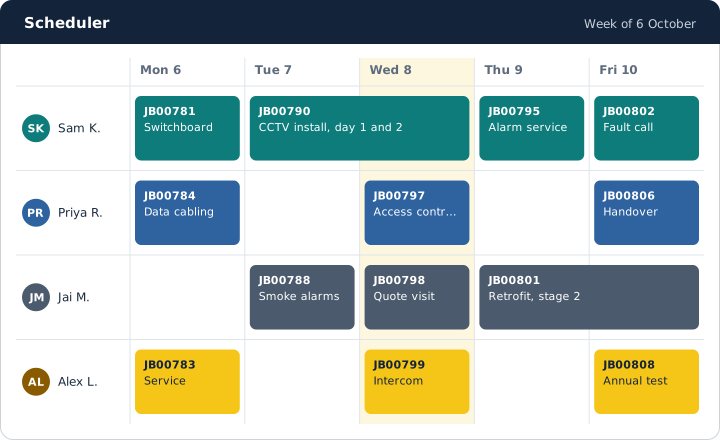
Drag visits onto staff and subcontractor lanes. Sync bookings with Outlook or Google Calendar, and text the customer before a visit.
Recurring jobs and service reminders
Jobs that come back on a schedule, and reminders that ask customers to book their next service.
Forms, documents and service reports
Forms with conditions and versions, job documents from templates, and service reports that the customer signs on site.
Completion checks and billing terms
Checks that must pass before a job completes. Time and materials, fixed price, contract, warranty or no charge, with purchase order limits.
Projects
Deliverables, a Gantt chart, progress claims, retention, a margin forecast and a handover pack for the customer.
Subcontractors
Book subcontractors, share a job sheet without prices, and check their insurance and licences before each booking.
Servicing
Tickets and response targets
Tickets from email, the portal and monitoring alerts. Response and resolve targets count business hours.
Service agreements
Support hours, covered sites and assets, and a fee invoice for each period.
Remote support time
Log time on a ticket and bill each ticket once.
Customer portal
Customers sign in to raise requests and see their jobs, signed reports, documents, quotes and invoices.
Asset register and maintenance
Equipment at each site, with test checklists, a life cycle, replacements and returns, and a 12-month maintenance planner.
Operations
Purchase orders and supplier prices
Order from suppliers, compare their prices, and import their price files from CSV or Excel.
Stock
Stock in stores and vans, with serial numbers, reservations for jobs, stocktakes and reorder.
Kits
Sell a group of items as one line, and split it into its parts when you need to.
Plant and fleet
Vans, tools and test equipment with service, calibration, registration and test-and-tag dates.
Accounting
Invoices
Invoice from the job or the quote. An issued invoice never changes: correct it with a credit note.
Card payments and deposits
Customers pay by card or direct debit through your own Stripe account. Ask for a deposit when a quote is accepted.
Accounting sync
Send invoices, supplier invoices and payments to Xero, MYOB or QuickBooks, and bring payments back.
Supplier invoices from PDF
Read a supplier's PDF invoice with AI and turn it into a supplier invoice.
Pay run, profit and charge-out rates
The pay run for your payroll system, a management profit and loss, overheads, and the break-even rate for each hour.
Currencies and tax
Australian GST by default. Tax rules for the United Kingdom, the United States, China, Singapore and Malaysia, and documents in other currencies.
HR
Org chart and departments
Who reports to whom, with templates for common kinds of business and custom roles.
Leave and onboarding
Leave requests with approval, and an onboarding checklist for each new person.
Licences and training
Staff licences with expiry reminders, and a warning when a booking needs a licence that the person does not have.
Pay rules, overtime and allowances
Pay rules with overtime rounding, overtime requests, labour rates and allowances.
Location tracking
Off by default. When the owner turns it on, staff get a notice first, and positions are kept only while they are clocked on.
Safety
Incidents and near misses
Anyone reports an incident with photos. Record the root cause and the corrective actions before you close it.
Hazard register
Rate each hazard, record its controls, and review it on time.
Legal
Legal matters
Disputes, claims and contracts in one register, with notes, files and an owner.
Compliance
Everything that expires in one list: company documents, subcontractor documents and staff licences.
Company
Modules and starters
Turn areas on and off. Start from Field service, Projects or Service desk.
Branches, roles and permissions
Branches with their own addresses and time zones. Roles decide who sees costs and prices.
Audit log
Every change, with who made it and when.
Department overviews and reports
A dashboard for each department, a report builder, and reports by email on a schedule.
Company files and documents
SharePoint, OneDrive or Google Drive folders for each customer, job and project. Company documents such as insurance certificates go with the work.
Document pool
Documents wait in one place until someone files them on the right record. Text is read from scans.
Automation rules and AI agents
Rules act on events. AI agents do routine work for a named person, inside limits, and ask before larger changes.
Company export
Owners download all of the company's data as one file.
Phone app and platform
iPhone and Android app
Today's visits, timers, notes, photos, forms, signatures, chat and the clock. It works without signal and sends the changes later.
Sign-in
Two-factor sign-in, and sign-in with Microsoft or Google. One sign-in for several companies.
REST API and webhooks
API keys with scopes and an expiry date, and signed webhooks for jobs, quotes, invoices, tickets and more.
A database for each company
Each company's data is kept apart, with a check of the company inside the database too.
Backups
Encrypted backups every night, and a regular test that restores them.